tinyapp, a small Flask test app
11
verified findings. Pixee examined all 8 entry points, 4 of 5 sensitive assets and 4 of 4 checkable controls, and the verdict names the one gap, the Flask session signing secret, which no mapped operation reaches.
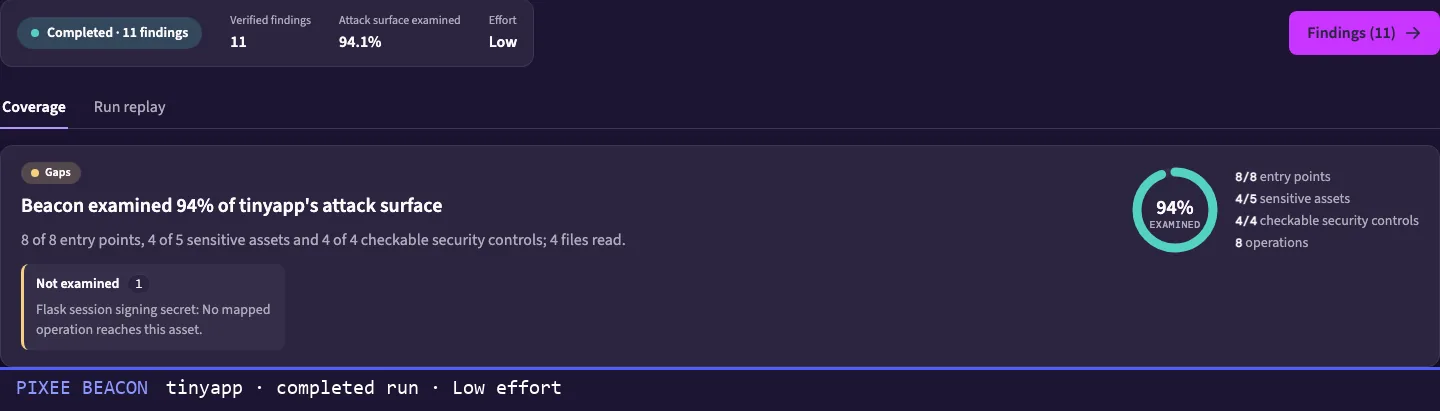
Pixee builds a threat model of your repository from the code, follows the paths an attacker would take and tries to disprove every lead. What holds up goes to the same triage and fix as the rest of your findings.
In the product as Pixee Beacon.
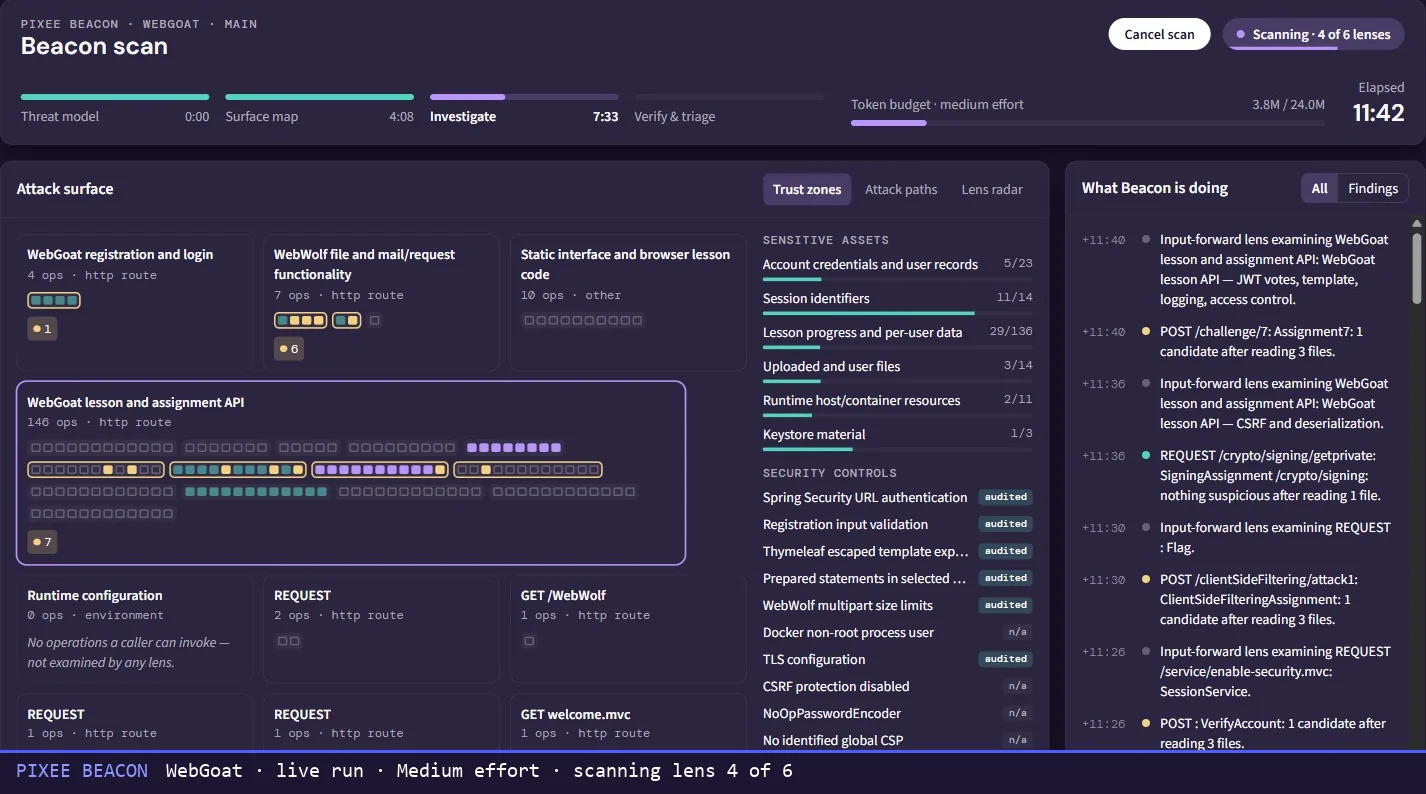
A live run on WebGoat, the open-source training app, at lens four of six with 146 operations mapped in one trust zone.
A good pen test comes back with a short list you can act on. It covers what the testers had time to reach, and your code has moved on by the time the report lands.
Your scanners keep running in between. They match code against the bug patterns they already know and hand you a queue to work through.
Then there's trust. Nearly half (46%) of the security and engineering leaders Intruder surveyed said what would most damage their trust in AI pentesting is not seeing what was tested, or not getting proof that a finding is real.
Pixee works as four agents, one job each. This one finds what an attacker could reach. The next two decide what's real and write the fix.
Pixee reads the repository and writes down its trust zones, sensitive assets, security controls and dangerous calls. Then it maps the attack surface, every entry point and what each one lets a caller do.
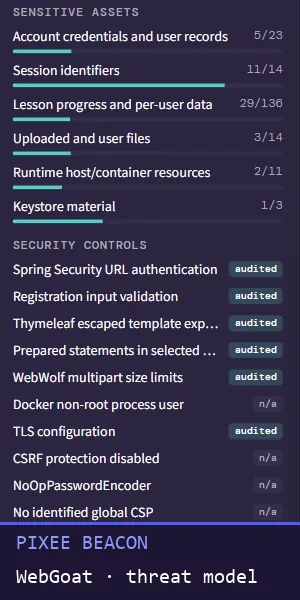
WebGoat · threat model · sensitive assets and security controls
Pixee plans its investigations across that surface and runs them through separate lenses, including these three.
The run log names each step, often down to the file and line it's reading.
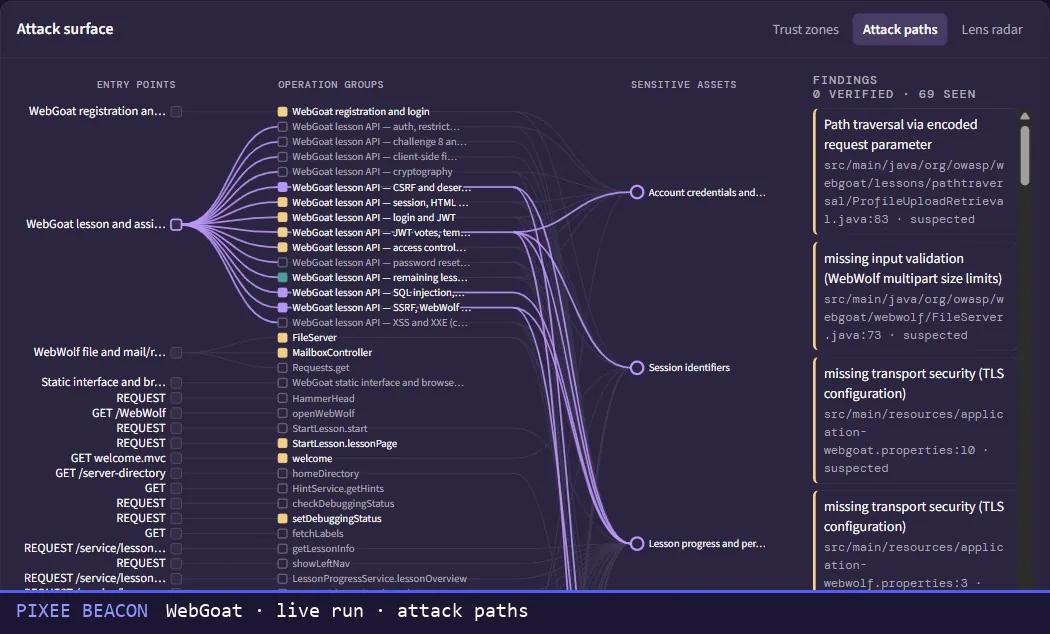
WebGoat · live run · attack paths
A verifier tries to disprove each candidate by reading the code, and it cites the lines it relied on. Is it reachable? Does an attacker gain anything? Does a defense already stop it?
It throws a lead out only when the code refutes it. When it can't settle the question, the lead goes on to Pixee's triage. Every lead dropped along the way stays on the page, with the stage that dropped it and why.
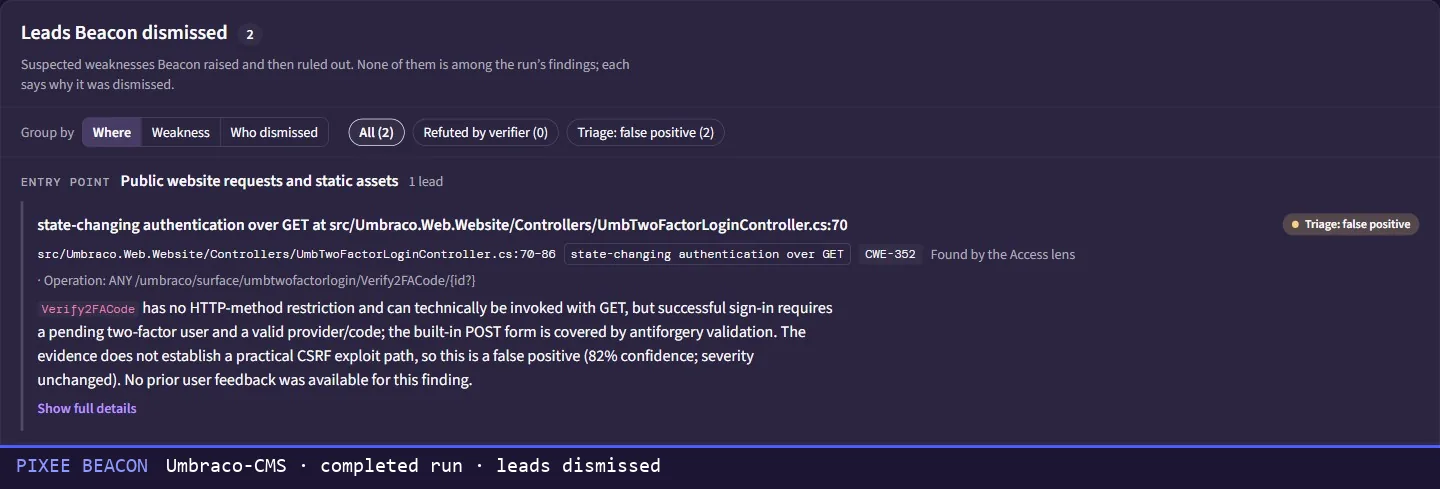
Umbraco-CMS · completed run · leads dismissed
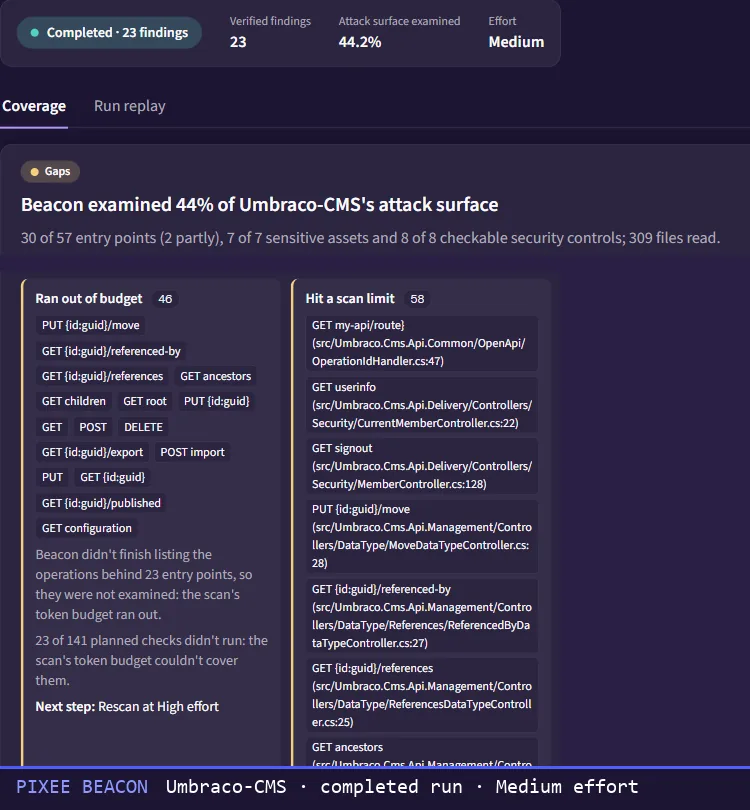
Each run ends with a verdict on the share of the attack surface it examined, counted by entry points, sensitive assets and checkable controls. "Complete" appears only at 100%. Below that, each gap is named with its reason and the next step.
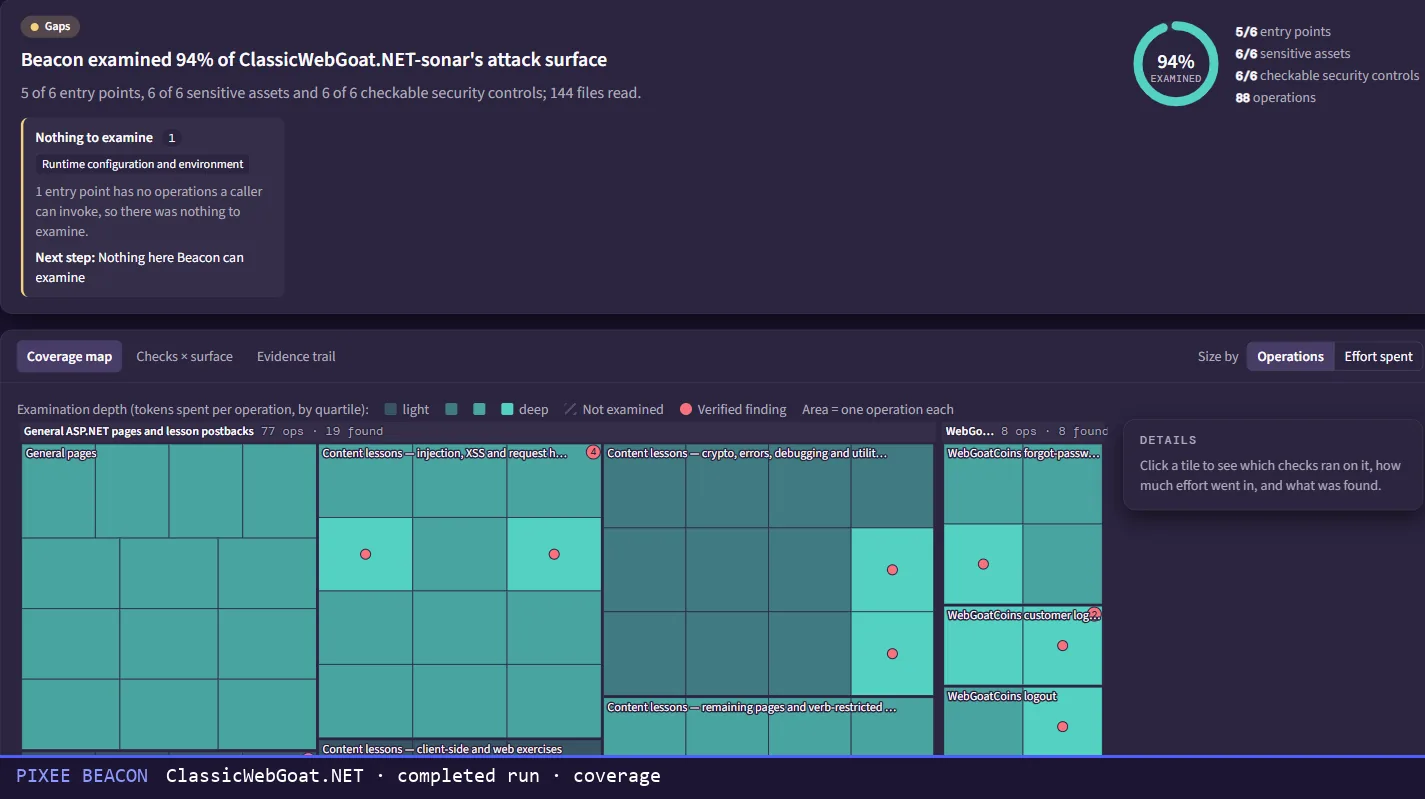
ClassicWebGoat.NET · completed run · coverage
Three examples from real runs on a test app and an open-source CMS. This is what a run hands you.
verified findings. Pixee examined all 8 entry points, 4 of 5 sensitive assets and 4 of 4 checkable controls, and the verdict names the one gap, the Flask session signing secret, which no mapped operation reaches.
examined, and the verdict says why. At Medium effort the budget ran out before Pixee finished listing the operations behind 23 of 57 entry points, and some checks hit a scan limit. The screen gives the next step, a rescan at High effort.
The access lens raised state-changing authentication over GET at UmbTwoFactorLoginController.cs:70. Triage marked it a false positive and wrote down why. Signing in still needs a pending two-factor user and a valid code, so the evidence shows no practical cross-site request forgery path.

A run's findings join the queue you already work, next to your scanners, pen tests and bug bounty. Pixee triages them the same way and opens the real ones as merge-ready pull requests in your conventions. Your developers review them like any other change.
Findings the verifier couldn't refute
A verdict on each, with the code that proves it
fewer false positives after triage
A merge-ready pull request for each real one
end-to-end resolution rate, triage and fix
Pixee customer cohort, 2025
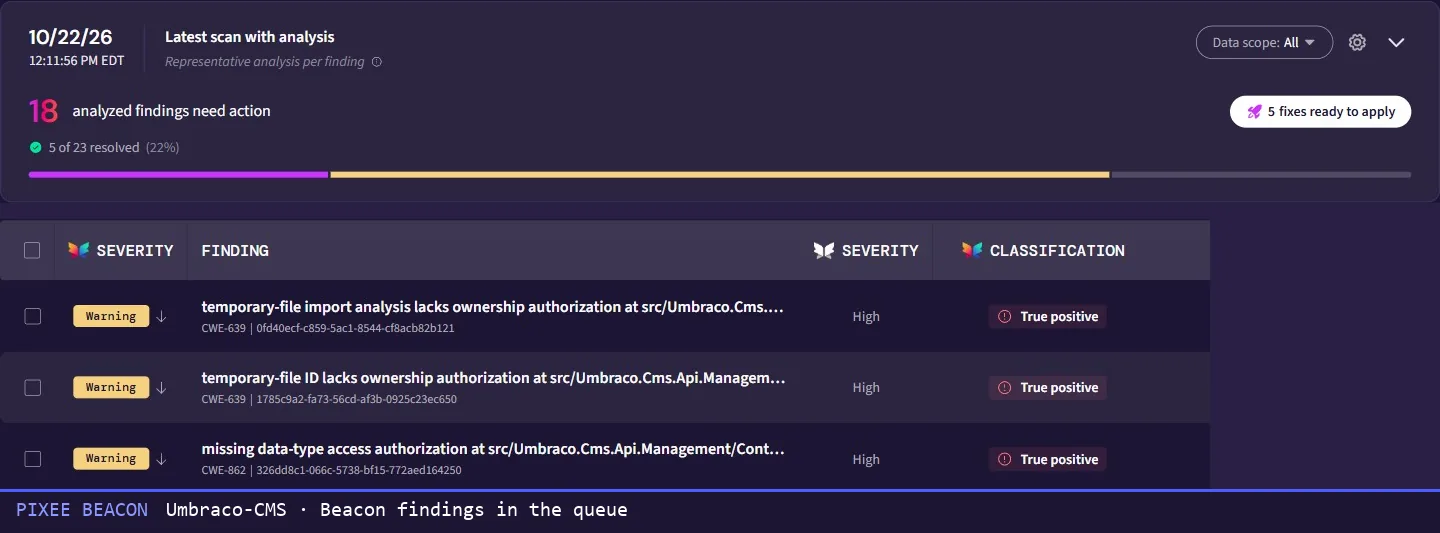
Umbraco-CMS · findings from a run in the queue
| What you run | What it does | What Pixee adds |
|---|---|---|
| Static analysis, rule-based or AI-assisted | Looks for known bug patterns and raises candidates for your team to work through. AI-assisted tools add ranking or explanations. | Starts from the threat model of your repository, follows the attack paths and tries to disprove every candidate before it calls it a finding. Its findings join the same queue. |
| Pen tests and bug bounties | Test the running application, mostly from outside. Pen tests run on a schedule, and bounties pay whenever a researcher reports. | The attacker's view from inside the code, per repository, whenever you ask, with a coverage verdict you can bring to your next pen test. |
| Threat-modeling tools | Build the model from diagrams, documents and the answers people give. | Builds the model from the code, then researches it to verified findings. |
| AI security agents that scan a repository | Bring large models to a repository, usually with a threat model and a verifier of their own. Most can export findings, file tickets or open fix pull requests. | Runs where you already triage findings from every tool, so its findings get the same queue, triage and fix pull requests in your conventions. Each run ends with a coverage verdict that names every gap. |
| External attack surface management | Inventories the domains, IPs and cloud services you expose to the internet. | Maps the attack surface inside your code, every entry point and what each one lets a caller do. |
MoneyGram serves 60 million active customers across 200 countries and territories and nearly 500,000 locations.
of findings processed automatically
hours saved across triage and fixes
Pixee Beacon is the name in the product for pixee.find, the threat modeling and detection agent in Pixee's purple team. You start a run on a repository and choose the effort. Pixee builds the threat model, follows the attack paths, verifies what it finds and sends the findings to the same triage and fix as every other source.
Your scanners match code against known bug patterns and hand you the results. Pixee starts from the threat model of your repository, follows the attack paths and tries to disprove each candidate before it calls it a finding. Then it tells you what it examined and what it ruled out. Keep your scanners. These findings land in the same queue as theirs.
Application attack surface analysis maps every way into an application, meaning its entry points and what each one lets a caller do, along with the assets and controls behind them. Pixee does it from source code. It builds the repository's threat model, maps the surface, follows the attack paths and reports what share of the surface it examined.
We don't publish an accuracy number for it. We show you the run instead: the coverage verdict, the verified findings and every dismissed lead with its reasoning. The verifier throws a candidate out only when the code it read refutes it. When it can't tell, triage decides, and each dismissed lead records which stage ruled it out.
We'll walk through a real run: the threat model, the attack paths it followed, what it dismissed and why, and where the findings went next.
Book a demo 94% and up to 95%: Pixee customer cohort, 2025 · 96% and 6,500+: MoneyGram case study · 46%: Intruder, State of AI Pentesting 2026

Every Thursday, 1,500+ security leaders get the week in AppSec cut down to a 5-minute read.
Join 1,500+ security leaders. Five minutes, once a week.
Your first issue lands Thursday.
One email a week. Unsubscribe in one click.